Manage and share backtests
Purpose
Every backtest you start lands in the Backtests tab of the Strategies area (Backtest Management). This page covers working with that history — opening and re-running runs, abandoning a stuck run to free your slot, deleting runs, clearing the whole history — and publishing a share link that shows a run’s results to people without a Senti account.
Starting a run is covered in Run a backtest; the report itself in Read the backtest report.
Prerequisites
- At least one backtest run in your history (the empty state reads “No backtests yet — run one from an EA in your library, or start here.”).
- To share a run: the run must be your own; viewers need only the link (and the passcode, if you set one).
Step-by-step
Work the Backtests list
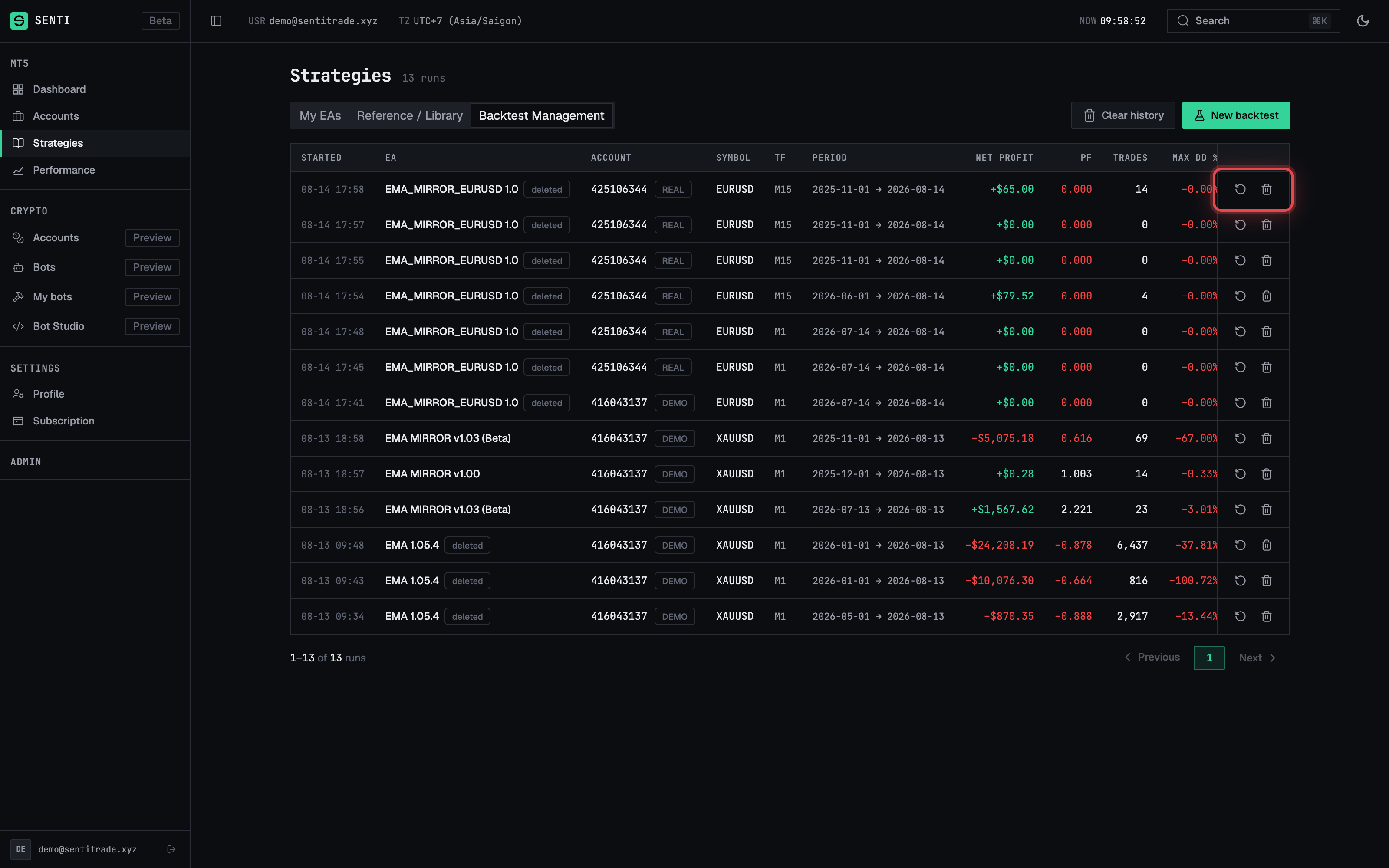
- Open the Backtests tab in Strategies. The table shows columns Started, EA, Account, Symbol, TF, Period, Status and Actions, and refreshes live while a run is active (“live · refreshing every {N}s”).
- Read the row metrics on finished runs: Net profit, PF (profit factor), Trades, Max DD % and Quality. A run whose history quality is below 100% carries the warning “History quality below 100% — the sample is thinner than the requested window”.
- Open a run with the row’s Open action to view its full report. Runs of a deleted EA are labelled “deleted EA”.
Re-run a backtest
- Press the row’s Re-run action (tooltip: “Re-run this backtest of {EA} on {symbol}”). It opens a new New-backtest form prefilled with that run’s full configuration — EA, account, symbol, timeframe, period, capital, model and inputs — for you to adjust and start.
- Expected outcome: a fresh run; the original is untouched. If the run’s EA has since been deleted, Re-run is unavailable (“that EA is no longer available”).
Abandon or delete a run
- Abandon a running backtest with its clear action — “Abandon this running backtest and free your slot”. Confirm in the dialog. The run ends as cleared (the run page will note there was no fault — you pressed Clear) and your single backtest slot is free again.
- Delete a finished or failed run with “Delete this backtest of {EA} on {symbol} from history” and confirm. This removes the run and its downloadable report.
- Expected outcome: the row disappears from the list.
Note. In the first moments after a run starts, the clear action is locked with a countdown — “{countdown} — this run is on the backtest server and may finish first”. Wait out the countdown; the run may complete on its own before it ends.
Clear your whole history
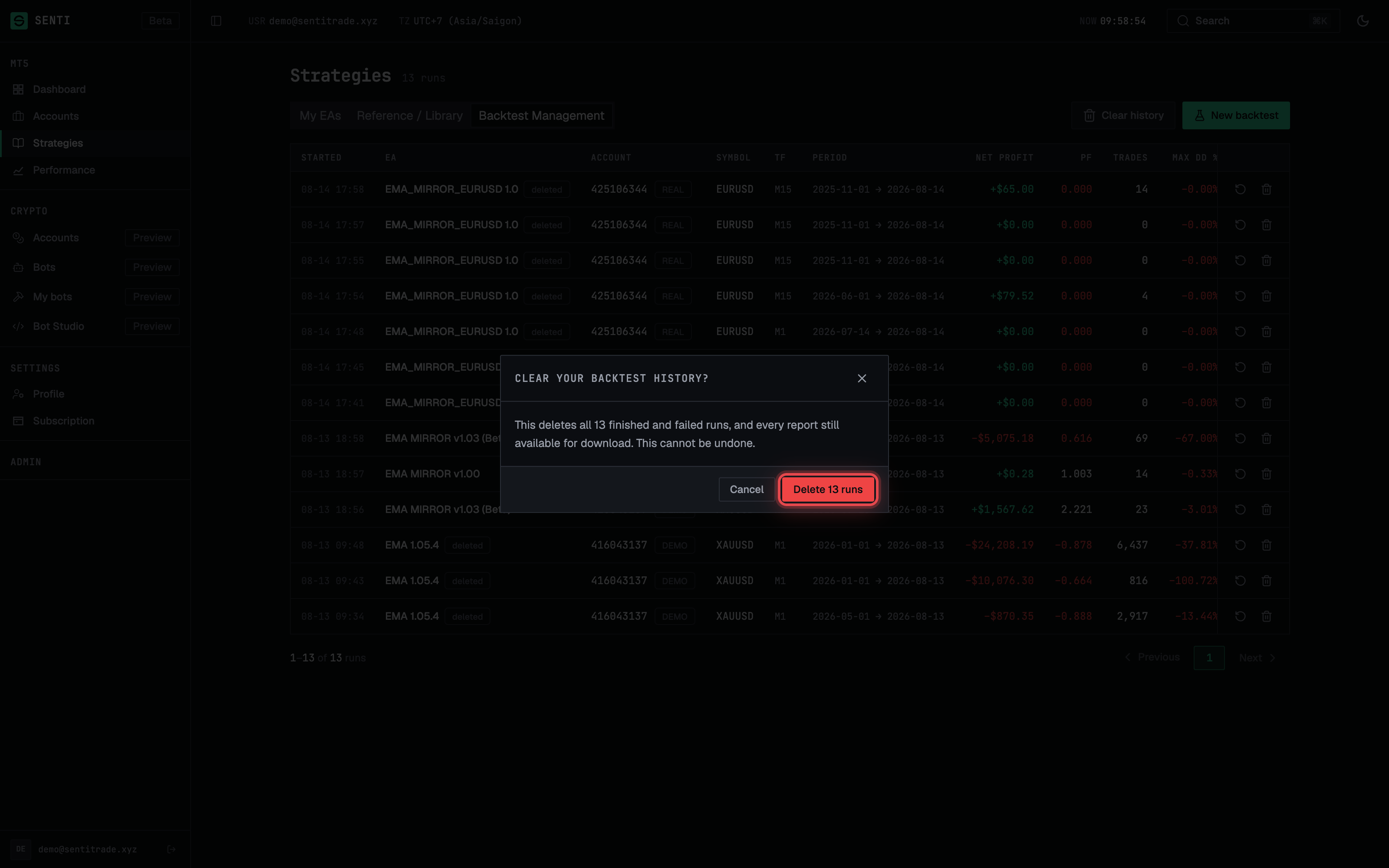
- Press “Clear history” above the list (tooltip: “Delete every finished and failed run from your history”; with nothing to delete it reads “Nothing to clear — you have no finished or failed runs”).
- Read the dialog — “Clear your backtest history?” It states the count: “This deletes all N finished and failed runs, and every report still available for download. This cannot be undone.” A currently running backtest “is not touched — it stays in your history and keeps running.”
- Confirm. Your terminal runs and their reports are deleted.
Share a run publicly
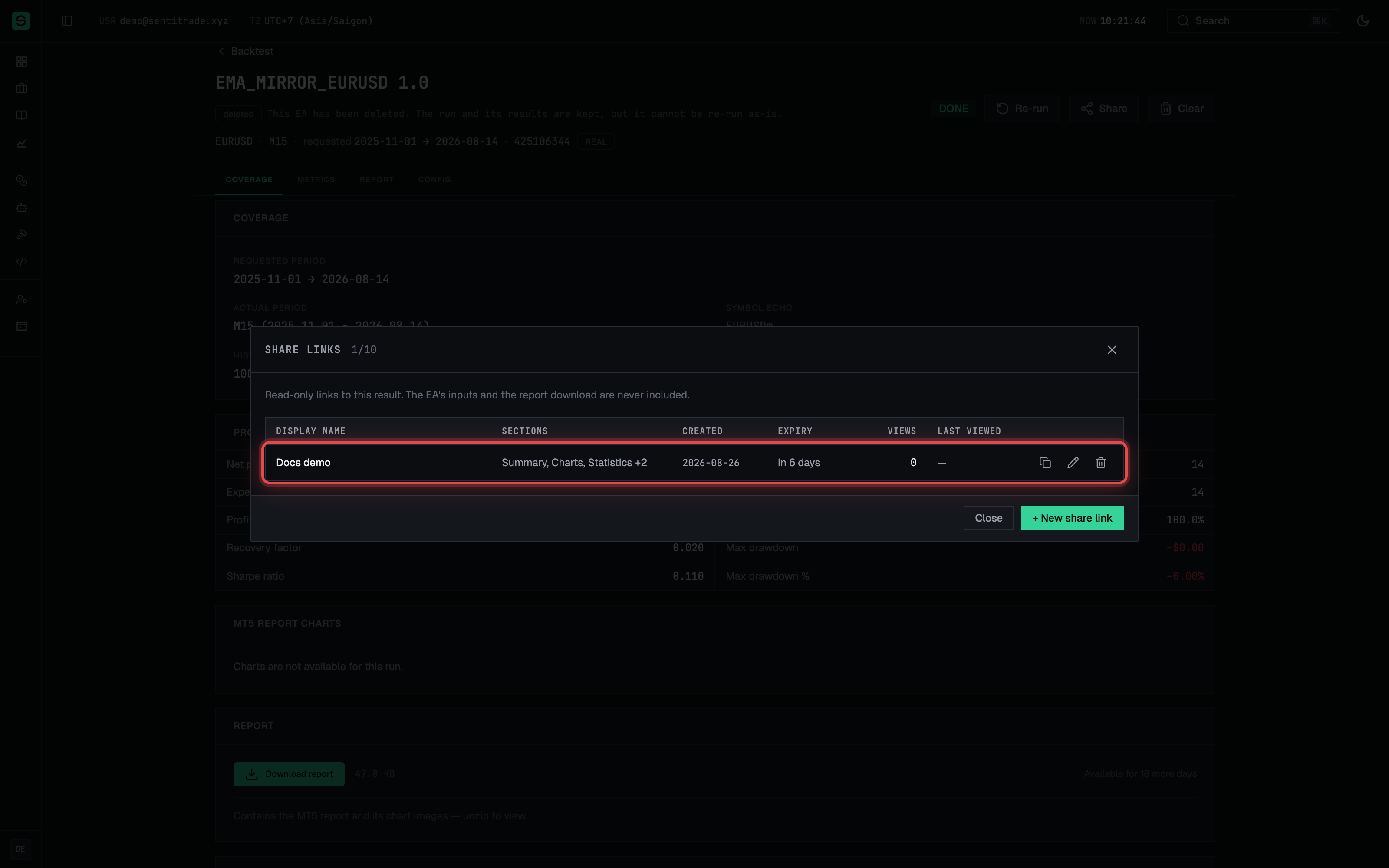
- Open the share manager from a run’s report page — the share button’s tooltip reads “Create a link that shows this result to people without a Senti account”. The Share links dialog lists existing links with Sections, Created, Expiry, Last viewed and per-link Edit share link / Revoke share link actions.
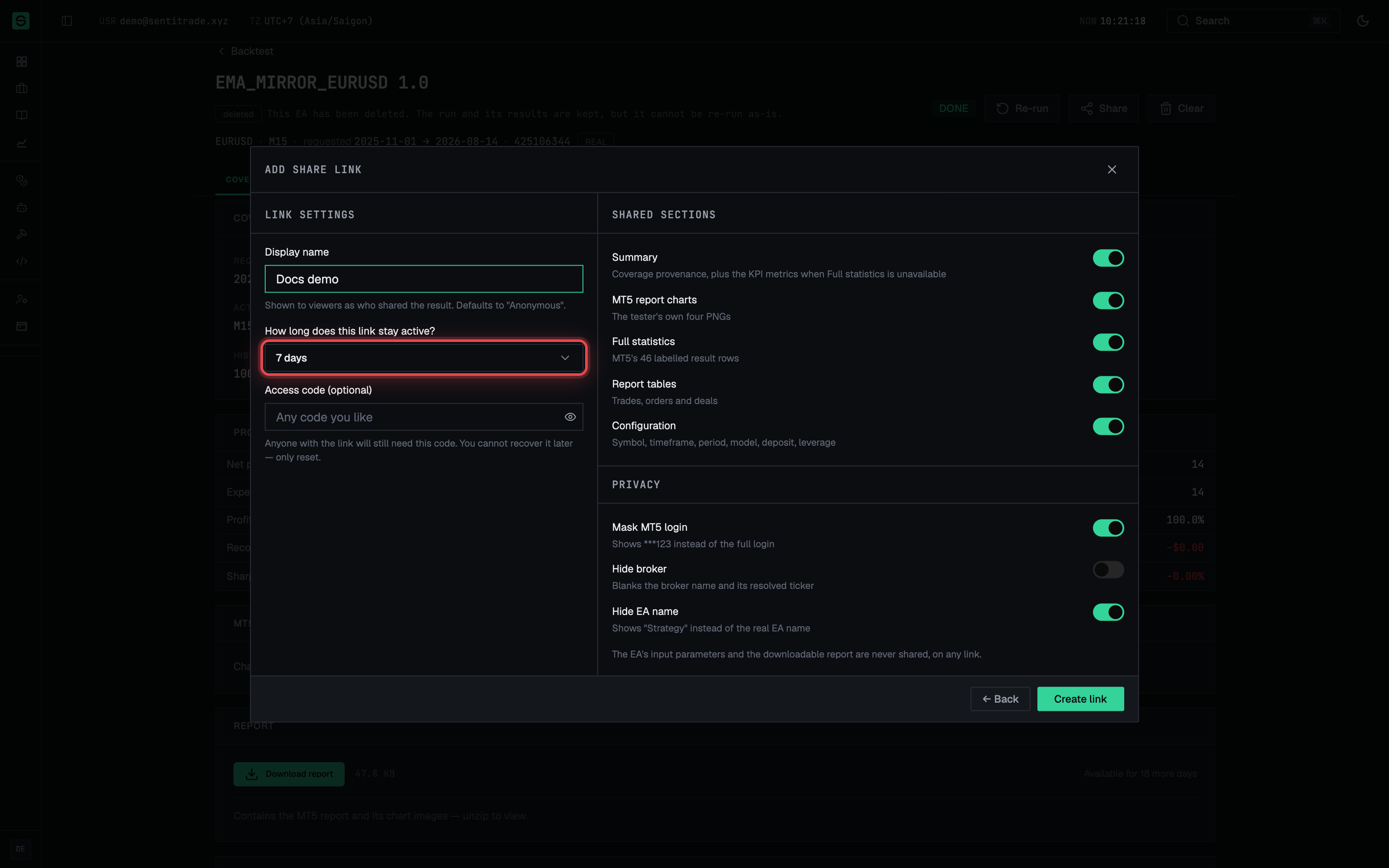
- Press “Add share link” and choose the Shared sections: Summary (coverage provenance, plus KPI metrics when Full statistics is off), MT5 report charts, Full statistics, Report tables (trades, orders and deals) and Configuration (symbol, timeframe, period, model, deposit, leverage). At least one section is required — “a link that shares nothing renders an empty page.”
- Set the Privacy masks as needed: Mask MT5 login (shows
***123), Hide broker (blanks the broker name and its resolved ticker) and Hide EA name (shows “Strategy” instead of the real EA name). - Configure Link settings. Give the link a display name (e.g. “Q3 gold strategy” — “shown to viewers as who shared the result; defaults to ‘Anonymous’”), pick an expiry — 1 day, 7 days, 30 days or Permanent (until revoked) — and optionally set an access code.
- Create the link and copy it. Anyone with the URL
(
/backtest/share/{token}) sees a read-only report limited to the sections you chose; a passcode-protected link asks for the code first.
Edit or revoke a share link
- Edit a link to change its sections, masks, name, passcode or expiry. Picking any expiry in edit mode resets it from now — re-picking the current bucket is how you renew a link.
- Revoke a link with Revoke share link and confirm in the “Delete share link” dialog. The URL stops working immediately.
Report a problem with a run
- Use the run’s “REPORT ISSUE” action to flag a run whose result looks wrong to the Senti team.
Warnings & constraints
⚠️ Deleting is permanent. Deleting a run, and Clear history, remove the runs and every report still available for download — this cannot be undone. Download reports you want to keep first.
⚠️ Share links expose real results. A permanent link works until you revoke it. Use the privacy masks (login, broker, EA name), an expiry and an access code when sharing outside a trusted circle.
- Abandoning is the only way to free your single backtest slot early; the action is countdown-locked while the run is being handed to the backtest server.
- Report artifacts also expire on their own after the 30-day retention window, independent of anything you delete.
- A share link shows only the sections you selected — nothing else on the run page leaks through it.
Common errors
| Symptom | Cause | Fix |
|---|---|---|
| Re-run action unavailable on a row | The run’s EA has been deleted since. | You cannot re-run it as-is; recreate the EA or start a fresh backtest with another EA. |
| Clear action locked with a countdown | The run was just handed to the backtest server. | Wait for the countdown — the run may finish on its own before it ends. |
| “Nothing to clear — you have no finished or failed runs” | Clear history only targets terminal runs and none exist. | Nothing to do; a running run is never touched by Clear history. |
| Share link shows an empty-looking page | Too few sections were selected when the link was created. | Edit the link and enable more Shared sections. |
| Shared link stopped working for viewers | The link expired or was revoked. | Edit the link and re-pick an expiry to renew it, or create a new link. |
| Viewer asked for a code they don’t have | The link is passcode-protected. | Send the access code separately, or edit the link and remove the code. |